000° Integrations · WooCommerce Available
Email marketing for WooCommerce, two keys and a free plugin.
Connect your shop with two REST API keys from your WooCommerce admin. Azimea brings in your customers, guest buyers and orders, then you switch on the abandoned cart and post-purchase flows.
Takes two minutes · Keys can be revoked from WooCommerce at any time

045° What we bring in from your shop
Everything you need to email the right person.
When you connect, Azimea reads your shop through the REST API. No files to upload, nothing to export. Whenever you like, bring the data in again with the “Sync” button on the orders screen.
- Registered customers
They become contacts, each with a consent status: existing customer, subscriber, no consent or unsubscribed.
- Guest buyers
People who ordered without an account, taken from their orders. Otherwise they would be missing from your list.
- Orders from the last 12 months
With their value and products. They power the segments: buyers, inactive for 90 days, high value.
- Carts left at checkout
Sent by the free Azimea plugin, with the email typed at checkout. This is where the abandoned cart flow begins.
- Order status
Paid, pending, completed, refunded. Anyone who has paid leaves the flow, and revenue is attributed correctly.
- What we don’t do
We never change products, prices or stock. We use write access to mark recovered orders.
090° Connecting
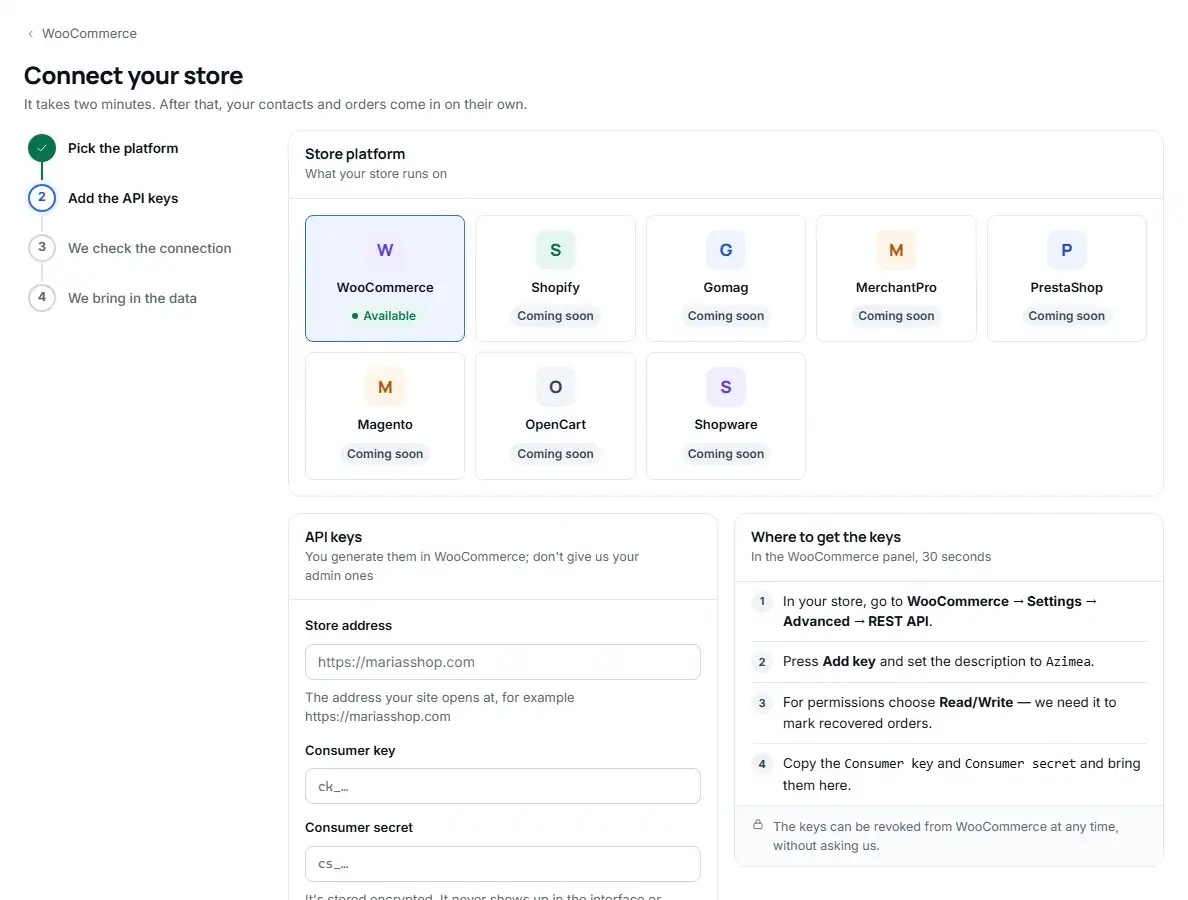
Four steps in WooCommerce. We take care of the rest.
- In your shop, go to WooCommerce → Settings → Advanced → REST API.
- Click Add key and enter the description
Azimea. - Under permissions, choose Read/Write, then generate the key. We need write access to mark recovered orders.
- Copy the
Consumer keyandConsumer secretinto Azimea, along with your shop’s address.
Azimea then checks the connection on the spot and starts bringing in your data. If something is wrong, it tells you exactly what: wrong key, wrong address or a blocked REST API.

135° Key security
Your keys are under lock. And they stay yours.
You never give us your admin password. You create dedicated keys, which you can see in WooCommerce and withdraw at any time, without asking us.
- Encrypted when saved
They never appear again in the interface or in logs, not for you and not for us.
- HTTPS only
Your keys never travel unencrypted between your shop and us.
- Revocable at any time
From WooCommerce → REST API. From that moment, Azimea can no longer read anything from your shop.
- Audit log
Who connected, changed or disconnected the shop, and when.
180° Requirements
What your shop needs.
An ordinary, up-to-date WooCommerce shop already has all of these. If you are not sure, send us the address and we will check.
- WooCommerce with REST API v3
Built into WooCommerce since version 3.5. Any current version works.
- Site on HTTPS
Your shop’s address must start with https://.
- Permalinks other than “Plain”
In WordPress → Settings → Permalinks, any option except “Plain”.
- An administrator account
Only an administrator can create REST API keys in WooCommerce.
225° Other platforms
Shopify and PrestaShop are Coming soon. You can sign up to hear first.
— Technical questions
For you, or for whoever builds your site.
Can’t find the answer? Write to us at suport@azimea.com.
Which version of WooCommerce do I need?
One with REST API v3, meaning WooCommerce 3.5 or later. Azimea reads customers and orders through the standard endpoints of that API, with no plugin. The free Azimea plugin, for abandoned carts, needs WooCommerce 8.2 or later.
Do I need HTTPS?
Yes. REST API keys are never sent unencrypted, so Azimea refuses addresses starting with http://. Most hosting companies provide a free certificate.
Do I need to install a plugin?
Not for customers and orders: those come through the REST API that comes with WooCommerce. For abandoned carts, yes: the free Azimea plugin, installed in a minute. You paste a store key and secret from the Azimea dashboard, and the dashboard tells you whether the plugin is talking to us. It does not touch your theme.
Can I withdraw access at any time?
Yes. In WooCommerce → Settings → Advanced → REST API, revoke the “Azimea” key. From that moment we can no longer read anything from your shop, and you do not need our permission.
I have several shops. Can I connect them all?
Yes. One Azimea account can connect several shops, within the limits of your plan. Each shop has its own keys.
What happens if I disconnect my shop?
We delete the keys and stop any imports in progress. The contacts and orders brought in until then stay in your account. You can reconnect at any time, with new keys.
000° Start today
Two keys and your shop is on the map.
14 days free, counted from the day you connect your shop. No card needed.