000° How it works
From connecting your shop to your first recovered cart.
Connect WooCommerce with two keys, switch on the two ready-written flows and see on your dashboard which orders came from email. Along the way, Azimea keeps to the rules that keep your customers happy.
14 days free, no card · The 14 days start when you connect your shop

045° Step 1 · Connect
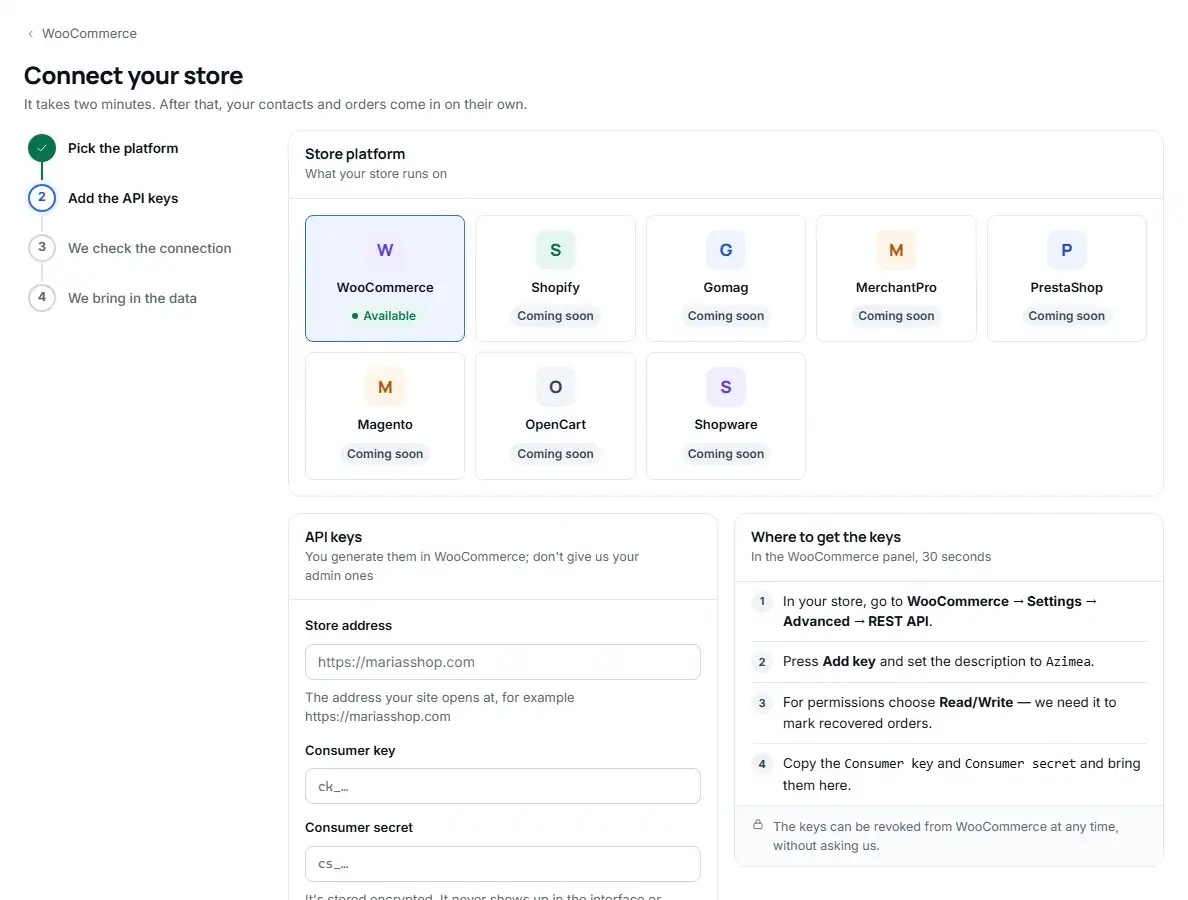
Link your WooCommerce shop. Two minutes.
Two REST keys bring in customers and orders; the free Azimea plugin, installed in a minute, adds abandoned carts. The keys are yours: you create them and can revoke them at any time.
- What you do
- In WooCommerce, go to Settings → Advanced → REST API, click Add key, enter the description “Azimea” and choose Read/Write. Copy the Consumer key and Consumer secret into Azimea, next to your shop’s address.
- What Azimea does
- It tests the connection on the spot and saves the keys encrypted; it never shows them to anyone again. It brings in registered customers, guest buyers and the orders from the last 12 months. Every contact gets a consent status: existing customer, subscriber, no consent or unsubscribed.
- How long it takes
- About two minutes for the keys. The import carries on by itself, in the background.
090° Step 2 · Switch on your flows
Two flows, already written. One click each.
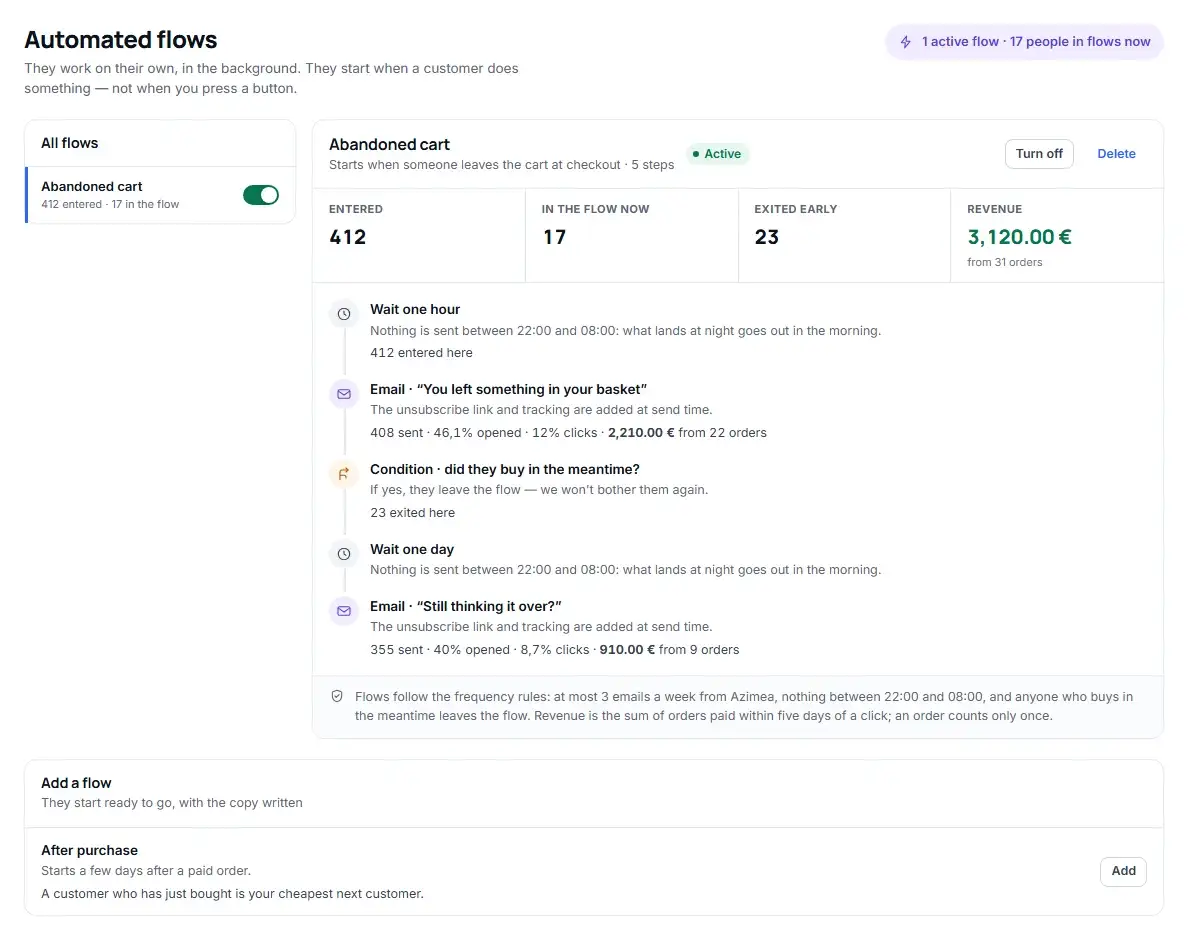
You do not start from a blank page. The flows come with the steps set up and the emails written, with no pushy discounts.
- What you do
- On the Automated flows screen, read the steps and the emails, then click Add. You can turn it off at any time, from the same place.
- Abandoned cart
- An hour after someone leaves their cart at checkout, they get “You left something in your cart”. If they still haven’t paid, the next day they get “Still thinking it over?”.
- After purchase
- Three days after a paid order, the customer gets “Is everything all right with your order?”.
- How long it takes
- A minute, long enough to read the emails.
135° Step 3 · See the money
See which orders came from email.
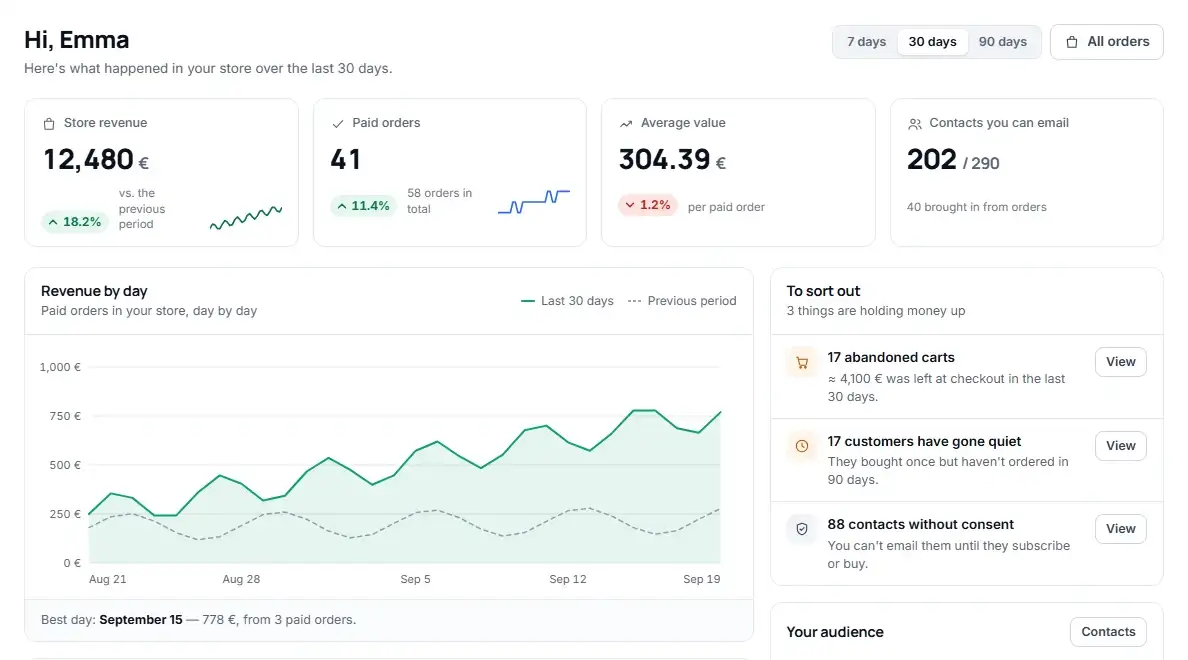
No marketing reports to decipher. The figures are in your shop’s currency, right next to the orders they come from.
- In every flow
- For every step: how many entered, how many emails went out, what percentage opened and clicked, plus the revenue and orders attributed.
- On the dashboard
- Your shop’s sales, paid orders and what needs attention: abandoned carts, customers who have stopped buying, contacts without consent.
- How it is counted
- An order paid within 5 days of a click in an Azimea email counts towards the revenue it brought, only once.
180° What Azimea does in the background
The rules you don’t have to remember.
They apply to every email, with nothing to set up. You will also see them in the app, under each flow.
- No more than 3 emails a week
That is the most a person receives from Azimea in a week. The rest waits.
- Nothing at night
No email goes out between 22:00 and 08:00. Anything due at night goes out in the morning.
- Anyone who buys leaves the flow
If they have paid in the meantime, they stop getting the emails nudging them to buy.
- From your own domain
Add SPF, DKIM and DMARC by following the steps in the app; we check them every hour. Emails go out from our server in France.
- One-click unsubscribe
The unsubscribe link and click tracking are added to every email automatically.
- Bounces and complaints
An address that does not exist, or a person who clicks “Spam”, gets nothing more. Automatically.
- We only email people you may email
Every contact has a basis: existing customer or subscriber. Nothing goes to contacts without consent or to people who have unsubscribed.
- 5-day attribution
An order paid within 5 days of a click counts towards the revenue, only once, in your shop’s currency.

225° What you need
Three things, and you already have them.
- A WooCommerce shop with the REST API
On HTTPS, with an administrator account to create the keys from. The REST API comes built into WooCommerce.
- Access to your domain’s DNS
Wherever you bought the domain, or at your hosting company. If someone else manages it, send them the records from the app.
- Ten minutes
Two for the keys, the rest for DNS and for reading the flows.
One free plugin, only for abandoned carts, and nothing to change in your theme.
— Questions
What shop owners ask us before they connect.
Can’t find the answer? Write to us at suport@azimea.com.
Do I need to install anything in WordPress?
Not for customers and orders: those come through the REST API that comes with WooCommerce, using two keys you create. For abandoned carts, yes: you install the free Azimea plugin, in a minute, and paste a store key and secret from the Azimea dashboard. The plugin does not touch your theme.
What data does Azimea bring in from my shop?
Registered customers, guest buyers (from orders) and the orders from the last 12 months, with their status. Abandoned carts come from the free Azimea plugin in your shop.
Who does Azimea email?
Only contacts with a basis: existing customers and subscribers. On every contact you can see the basis and where it came from. Nothing goes to contacts without consent or to people who have unsubscribed.
Can I turn a flow off after switching it on?
Yes. On the flow’s screen, click “Turn off”. Nobody new enters, and people already in the flow stay where they are. If you turn it back on, they carry on from where they stopped.
How much does it cost after the 14 days?
From €19 a month + VAT, depending on your number of active contacts. The trial needs no card, and the 14 days start when you connect your shop.
000° Start today
Ten minutes to set up, then back to your shop.
14 days free, counted from the day you connect your shop. No card needed.